Articles by "computer tricks"

Showing posts with label computer tricks. Show all posts

Do you want to know if your Android phone or tablet is otg enabled, then otg usb checker v6.0 will help you to find out if you Android device support OTG or not as not not Android phones or tablets supports it.

USB OTG Checker is tool that can quickly and effectively to fully check and verify your Android device system USB OTG capabilities without Rooted your Android Phone or Tablet.


What is USB OTG 
You might be asking what is USB OTG. Usb otg is a small device or mini object in USB form, which is used to connect smartphone and pc together, so as to transfer or share files and data's. It is not just connecting smartphone andand pc together, you can connect your phone or tablet to any device that supports USB. It can be your playstation game, your DVD or any other.


Sometimes it is required to have a USB OTG cable to connect some device like for example printer. You can connect your phone and your printer directly, no, it requires an otg cable which consists of male and female head.
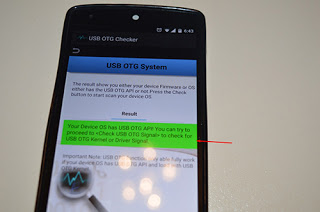


Some Android phones supports OTG especially high end mobile device while others don't, so if you are not sure if your device supports it, then otg usb checker v6.0 apk will help you with that.

Another point to note that if your phone doesn't have an external memory card that is SD CARD support, you can use OTG USB to store your files especially if your internal storage is overloaded.

Features of usb otg check v6.0 apk free 
1.Check Device OS on USB OTG: Your device operating system or custom ROM has the USB OTG API?

2.Check USB OTG Signal: Your device has load with USB OTG driver or kernel to communicate to the USB OTG Connected device?

3.Browse USB OTG Storage: Can you access ( View ) the USB OTG connected External Storage Folder?

USB OTG Checker does not require root access, so if your Android phone or tablet is not rooted, it will work very well. 
Download USB OTG Checker APK V6.0 Free 
If you are not sure of your device supporting OTG, then go ahead and download this nice application to verify your Android phone or tablet. 

Download link 


https://www.datafilehost.com/d/64d76f41

STEP*1*Login to your blogger dashboard with your gmail account>> select template, it will be something like the image below.
STEP*2*Then select backup/restore on the top right corner of the template page
Step 3. Find a suitable and mobile responsive template design.
There are many blogger template design on the web either the premium ones or the free ones, although premium templates are the best but newbie bloggers are not ready to spend cash in the beginning. I'll advice you to go for free templates and download.
Note;
Blogger template always ends with the file extension of .XML. if you come across a template with .ZIP. format extract it and locate the .xml file.

In today's tutorial u will be giving out a free premium template for practice.
Download here

STEP*4*Upload your Template.
Now that you have downloaded the template above or your desired template it's time to upload it to make your blog look nice.

-Open your downloaded template with Es File Explorer or Winrar and extract,
-Login to your blogger dashboard>>Click Template>>Backup/Restore

STEP*5*Select choose a file

STEP*6*Now it's time to located the file with .xml in the folder you extracted to, select the template and upload it.

Yeah, you have successfully install a new template on your blog. To check out the new design of your blog, visit your site and click web version at the bottom to see the wonderful design.

Do you find this article helpful??  Give us feedback through the comment box.

We love comments......

Have you ever thought of having unlimited likes on Instagram??
Well its possible
First of all make sure your phone is rooted


Required apps
*cheatdroid Download here
*instalikes Download here

After you've downloaded the files now open the intalikes login your username and password, check the amount of coin you have.. For example 150coins

Next step

Open your cheatdroid search for intalikes click on it


Click on userpoints.xml then your 150 coin will appear, clear the 150 coin and input 99999 then go back to your intalikes swipe to the left and select the picture you want to gets likes on... Make sure you start wit 200 likes, that's all..
Drop your comments below

Comments System

Author Name

Contact Form

Name

Email *

Message *

Truze. Powered by Blogger.